Skip to product information
1 of 10

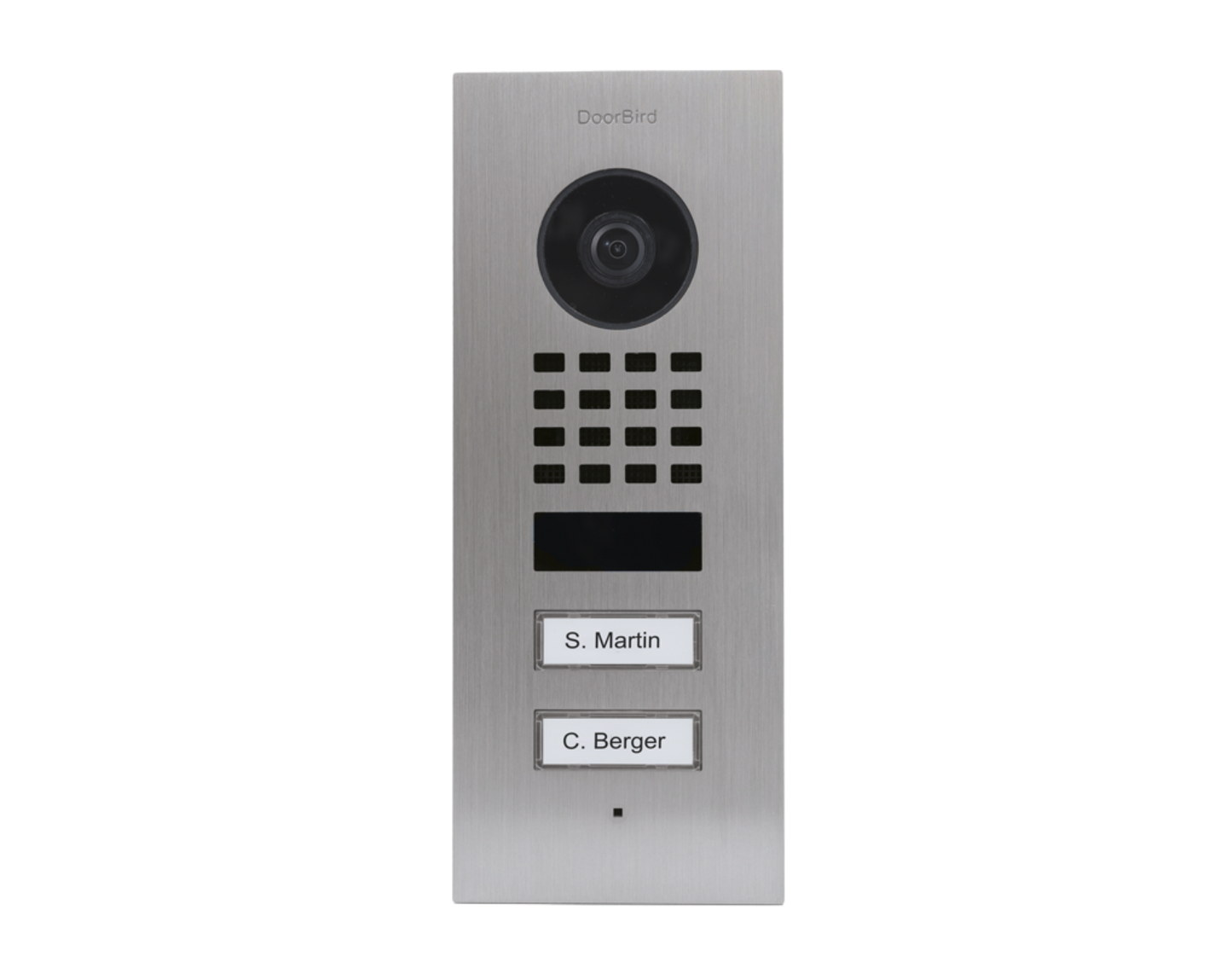
DoorBird D1102V Flush-Mount IP Video Door Station, 2 Call Button in Stainless Steel V2A - 423866805

DoorBird D1102V Flush-Mount IP Video Door Station, 2 Call Button in Stainless Steel V2A - 423866805

Regular price $724.99 USD
Regular price $966.10 USD Sale price $724.99 USD
Sale Sold out

Description

DoorBird D1102V Flush-Mount IP Video Door Station, 2 Call Button in  Stainless Steel V2A - 423866805

For multi-tenant buildings and businesses with 2 units, 2 call buttons

Stainless steel V2A, brushed
(GTIN/EAN: 4260423866805, P/N: 423866805)

  • Flush-mounting housing included
  • WiFi / LAN connection (PoE capable)
  • 2-way audio
  • Ultra-wide angle lens, 1080p, night vision, IR LEDs
  • 4D motion sensor
  • 1 freely configurable bistable switching relay
Features
  • Open API: Local interface for integration with third-party systems and SIP

  • Video and audio call: On smartphones, tablets (iOS, Android), IP and landline phones (SIP)

  • Smart Transmission Mode (STM): Real-time audio / video communication, optimized for mobile devices via WiFi, 3G, 4G, 5G

  • Smart Home & NVR compatible: Control4, Loxone, Crestron, Synology, AVM FRITZ!Fon, URC, QNAP, RTI, ELAN, Fibaro, Bang & Olufsen and others

  • Microphone: Clear voice transmission

  • Automatic door buzzer: For use in medical offices and office environments

  • Individual action schedules, e.g.: - Switch relay 1 for automatic door release Mon-Fri from 9 am until 4 pm when the call button is pressed

    4D motion sensor switches on external lamp between 9 pm and 6 am

  • Geofencing: Automatic door and gate opening when returning home

  • Night vision: With Infrared LEDs

  • HDTV Video: Ultra wide-angle, hemispheric lens, 180°

  • Light sensor:  For night vision mode

  • One freely configurable bistable latching relay: Control one door or one gate via App. Status configurable via App: temporary or permanent circuit

  • Easy self-install: Quick installation via QR code scan

  • Call button:  With backlit nameplate

  • Motion sensor with 4D technology: Distance up to 6 m (19.7 ft) adjustable via App (interval: 1 m/ 3.3 ft)

  • Noise reduction and echo cancellation (AEC, ANR)

  • Easy connection to the network: Connection via a network cable or bell wire via 2-Wire Ethernet PoE Converter “DooBird A1071” (PoE, network data)

  • WiFi enabled:  Works within a WiFi network, no LAN cable needed

  • Bluetooth Low Energy (BLE):  For access control, compatible external sensors and smart locks

What our Experts Think
  • High-Quality Construction – Stainless steel V2A ensures durability, corrosion resistance, and premium feel.

  • Dual Call Buttons – Allows efficient access for multiple users or apartments.

  • Flush-Mount Design – Sleek installation integrates seamlessly into modern entrances.

  • HD Video & Audio – Crystal-clear communication for secure visitor verification.

  • Reliable IP Connectivity – Works with DoorBird D1102V system for smart, networked access control.

  • Low Maintenance – Built for long-term use with minimal upkeep.

Q&A

Q1: What is the DoorBird D1102V Flush-Mount Video Door Station?
A1: An IP-enabled flush-mount video door station with 2 call buttons, offering high-definition video, audio, and secure access control.

Q2: What materials is it made from?
A2: Crafted from corrosion-resistant stainless steel V2A for durability and outdoor suitability.

Q3: Is it compatible with smart home systems?
A3: Yes, integrates with DoorBird’s IP ecosystem and supports remote access via the DoorBird app.

Q4: How secure is it?
A4: Features encrypted communication, anti-tamper protection, and detailed access logs.

Q5: How is it installed?
A5: Flush-mount design for professional installation; compatible with standard D1102V mounting procedures.

Maintenance Tips
  • Clean Regularly: Wipe stainless steel surfaces and call buttons with a soft microfiber cloth to remove dust, fingerprints, and grime.

  • Use Mild Cleaning Solutions: Lightly dampen the cloth with water or mild soap if needed; avoid abrasive cleaners or solvents.

  • Keep Camera Lens Clear: Gently clean the camera lens with a soft, lint-free cloth to maintain video clarity.

  • Protect from Water Accumulation: Ensure water does not pool around the station; the unit is weather-resistant but not fully waterproof.

  • Inspect Mounting & Wiring: Periodically check that the station is securely installed and all connections are intact.

  • Maintain Firmware: Keep DoorBird system firmware updated for optimal video, audio, and button functionality.

View full details